
Originally Posted On: https://hometipsforyou.com/5-ways-aeron-chairs-reduce-lower-back-strain-during-long-video-calls/
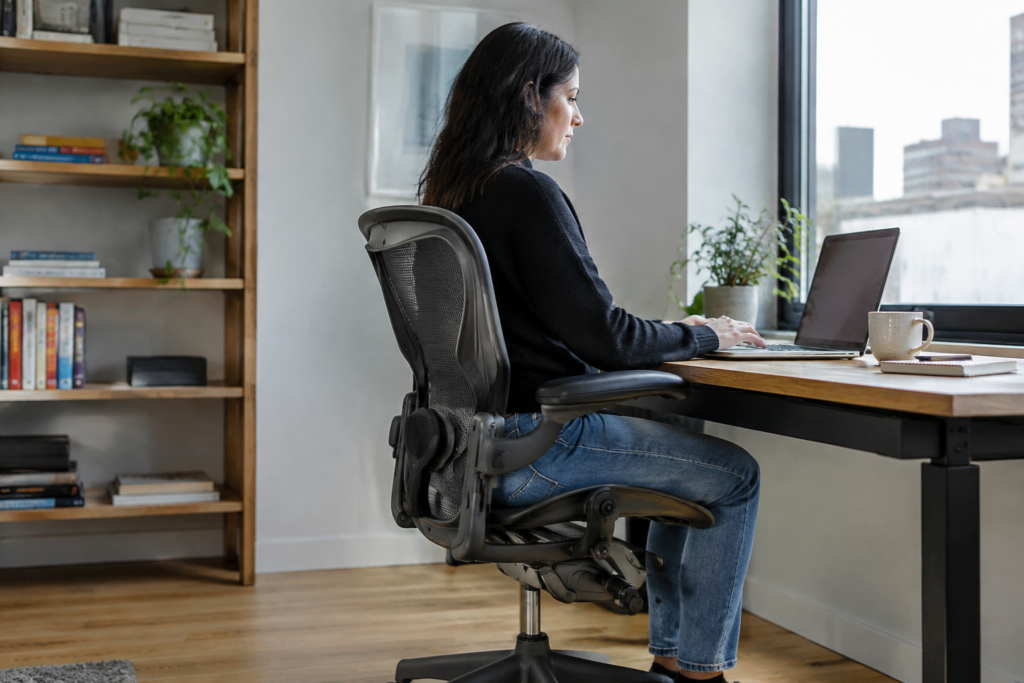
Top Picks at a Glance
Five Aeron features that take the load off your lower back on long video calls:
-
PostureFit SL: supports sacrum and lumbar together
-
8Z Pellicle mesh: spreads pressure, stays cool
-
Right size (A, B, or C): puts lumbar support where it belongs
-
Harmonic 2 tilt: keeps support while you move
-
Adjustable arms and height: shoulders relax, spine unloads
Bonus: a certified pre-owned Aeron from Madison Seating comes with a 10-year warranty.
Three hours of back-to-back calls lock you into one posture. Your head drifts toward the camera, your pelvis rolls back, and by the third meeting your lower back is complaining loudly.
Remote — hybrid professionals who just moved up from a dining chair or a temporary setup feel it in the lumbar spine first. Always. After 20+ years of workplace ergonomic assessments, I’ve watched that same pattern play out in hundreds of home offices (and it rarely fixes itself).
That’s where Aeron chairs come in. Herman Miller makes the Aeron in a classic version and a remastered one, and both were built to keep a sitting body supported through long, mostly still hours. But does the design actually earn its reputation on video calls? Some features do the heavy lifting. Others are nice to have. Knowing which is which saves you money and saves your back.
Intro: Why Video Calls Wreck Your Lower Back (and Where an Aeron Fits)
Three hours of back-to-back calls lock you into one posture. Nobody moves much when they’re staring at a camera, trying to look attentive. A remote manager on a dining chair slides forward by the second meeting, and by the third, the lower spine is doing all the work.
That’s the pattern showing up in the lumbar region first.
In 20+ years of workplace ergonomic assessments, the same complaint came up again and again from people upgrading a temporary setup. Their chairs simply couldn’t hold them up.
The five features below explain how Aeron chairs take the load off. Herman Miller builds the chair in a classic and a remastered version, and both share the core design. Here’s the part most buyers miss: the Herman Miller Aeron task chair works because of adjustment, not looks. Size matters too. (We’ll get to that.)
1. PostureFit SL Supports the Sacrum and Lumbar Together
Slump is a pelvis problem, not a willpower problem. On a long video call, Aeron chairs with PostureFit SL give the lower spine two points of contact instead of one, which is why a Herman Miller Aeron ergonomic office chair holds up through a four-hour meeting block.
How the dual-pad design keeps your pelvis tilted forward
PostureFit SL uses two pads: one behind the sacrum, one at the lumbar curve. Lean toward your camera and the pelvis rolls back. The spine folds into a C-curve. The sacral pad stops that roll, so the lumbar pad can do its job.
Tip: turn the knob until you feel gentle pressure, not a push. Then recheck it after one week, once your muscles adjust.
PostureFit SL versus the adjustable lumbar pad
-
PostureFit SL: best for anyone sitting six or more hours, or anyone with a history of tailbone and low-back soreness.
-
Adjustable lumbar pad: a strap-controlled pad that slides up and down. Fine for lighter use and people who dislike sacral pressure.
The recommendation is simple: pick PostureFit SL. Both setups exist on classic and remastered frames, and every Herman Miller Aeron office chair from Madison Seating is certified and built with authentic Herman Miller parts in either configuration.
2. 8Z Pellicle Mesh Spreads Pressure and Keeps You Cool
Ever notice how you start fidgeting around the 40-minute mark of a long call? Heat and pressure points are usually the cause. The seat gets warm, your sit bones ache, and you shift. On camera, that reads as restless.
The 8Z Pellicle on Herman Miller Aeron chairs splits the seat—back into eight zones of tension. It’s firmer under the sit bones, where your weight lands, and softer at the thighs, where foam would squeeze blood flow. No single spot takes the load.
Mesh also holds its shape. Foam compresses and flattens within a few years. Pellicle doesn’t, which is why a pre-owned Aeron with a certified inspection can still support like a new one.
Picture a two-hour call block in a warm room. Air moves through the mesh, so your shirt stays dry. A Herman Miller Aeron desk chair keeps heat from building under your thighs.
-
Firmer zones under the sit bones
-
Softer zones at the thighs
-
Open weave for airflow
The payoff is simple.
You sit still because you’re comfortable, not because you’re stiff.
3. Getting the Right Aeron Size (A, B or C) So Your Back Actually Gets Support
About 70% of buyers land on Size B. That’s the number that matters most here. Pick the wrong size, though, and the lumbar pad sits too high or too low, so the support misses your spine completely. A Herman Miller Aeron ergonomic chair only works when it fits your frame.
-
Size A: 4’10” to 5’7″, under 130 lbs. Seat depth: 16″.
-
Size B: 5’3″ to 6’2″, 130 to 230 lbs. Seat depth 16.5″. Seat height 16″ to 20.5″.
-
Size C: 5’9″ to 6’6″, over 200 lbs. Seat depth 17.5″.
Between sizes? Check seat depth first. Sit all the way back and leave two to three fingers of gap behind the knee. Less than that, and the front edge pinches circulation. More, and your thighs lose support.
Every Aeron chair by Herman Miller sold through Madison Seating also carries a 30-day money-back guarantee. If the size feels off after a week of video calls, send it back and swap. Most people know within two weeks.
4. Harmonic 2 Tilt and Tilt Limiter Let You Move Without Losing Support
Sitting perfectly upright all day is a myth. A rigid 90-degree pose loads the same spinal discs for hours, and that’s exactly what tightens a lower back during back-to-back calls. Aeron chairs fix this with the Harmonic 2 tilt, which senses body weight and follows every small shift without a lever.
The tilt limiter and tension knob do the setup work. Here’s the call-day routine:
-
Listening calls: set the limiter to the middle position and ease tension until a light push reclines you about 15 degrees.
-
Presenting: lock the upright stop so your torso stays stacked over the pelvis.
-
Screen share: switch on forward tilt, which rolls the pelvis ahead so you can lean in without slumping.
Forward tilt ships on a Herman Miller Aeron fully loaded build, so check the configuration before ordering. Buyers browsing a Herman Miller Aeron side chair style should confirm the same controls are there.
Realistically, you’ll change positions a dozen times per hour. Good.
The best posture is your next posture.
5. Adjustable Arms and Seat Height Take Load Off Your Spine
Picture a 40-minute video call where the armrests sit too low. The shoulders creep up, the neck juts forward, and by minute thirty the lower back is doing the compensating. That’s a common pattern in home offices. On a Herman Miller Aeron, arms that hold the forearms stop that chain reaction early.
The fully loaded setup adds height, width, depth, and pivot adjustment. Semi-loaded arms move up and down only. If you type, mouse, and take calls all day, the upgrade pays off. A Herman Miller Aeron executive office chair in the fully loaded build is the one to pick.
A 3-Step Setup Routine
-
Feet flat. Set the seat height so your soles rest on the floor.
-
Thighs parallel. Knees level with hips, with no pressure behind them.
-
Camera at eye level. Raise the laptop so you don’t crane downward.
One more thing: swap in hardwood floor casters if your office has wood or tile. They roll quietly — won’t scratch the floor.
How to Choose: Is a Used or Refurbished Aeron Worth It for You?
Yes, for most remote professionals, it is. A pre-owned Aeron gives the same ergonomic support as a new one, minus the sticker shock.
Run through this checklist first:
-
Height and weight: Size B fits roughly 70% of people (5’3″ to 6’2″). Go A under 5’7″, C above 5’9″ and 200+ lbs.
-
Call hours: Five or more hours of video calls daily? Pick PostureFit SL and a fully loaded setup.
-
Floor type: Hardwood needs soft casters. Thick carpet needs deep-carpet ones.
-
Configuration: Adjustable arms and a tilt limiter matter more than color.
Here’s the catch with used chairs: condition varies wildly. Madison Seating removes that gamble. Every chair gets a 127-point inspection, authentic Herman Miller parts where wear shows up, and a 10-year warranty. Delivery is free across the USA, and a 30-day money-back guarantee covers sizing mistakes.
The verdict? Buy a certified Aeron office chair in your size and skip the guesswork. Browse the Aeron chairs for sale by size today.
Your back is already voting. Listen to it.
Long video calls don’t break a back all at once. They do it slowly, one slumped hour after another. The Aeron answers that in specific ways: PostureFit SL holds the pelvis tilted forward, the 8Z Pellicle mesh spreads pressure and vents heat, and Harmonic 2 tilt lets the body keep moving without losing support.
Size decides whether any of that works. A chair that’s too big or too small puts the lumbar pad in the wrong spot, and the best engineering can’t fix that. Most people land on Size B, but anyone near the edges of the height and weight ranges should check seat depth before ordering.
Remote and hybrid professionals who want these benefits don’t have to start with a new-chair budget. Madison Seating’s certified, pre-owned aeron chairs go through a 127-point inspection, use authentic Herman Miller parts, and carry a 10-year warranty, plus free delivery in the USA and a 30-day money-back guarantee.
Next step: measure your height, note your weight, and match them to Size A, B or C. Then browse Madison Seating’s Aeron selection in that size and pick the configuration that fits your call schedule. Your lower back will notice by the end of week two.


